HOW TO CREATE UNIVERSE PARTICLE ANIMATION USING THREE.JS
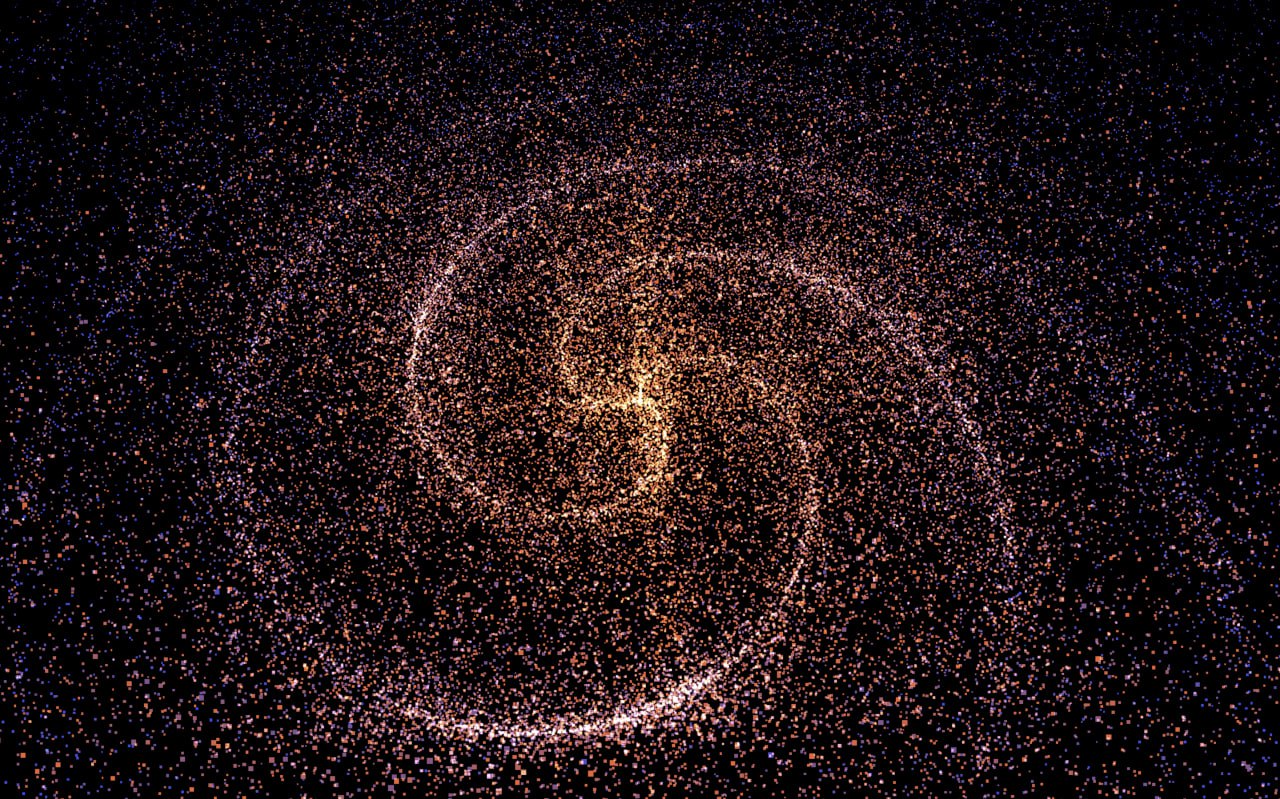
In this project we will create a stunning universe particle animation using Three.js and JavaScript. Thousands of particles are rendered on a canvas to form a rotating galaxy effect that looks like a real space animation. This tutorial helps beginners understand how WebGL and modern JavaScript libraries can be used to build advanced visual effects and interactive web animations.
Technologies Used
- HTML – structure of the animation canvas
- Three.js – rendering thousands of particles in 3D space
- JavaScript – controlling galaxy animation and particle movement
HTML Structure Explanation
The HTML part of this project is responsible for creating the basic structure of the animation. We use a canvas element which acts as the drawing area where all particles will be rendered. The canvas is controlled using JavaScript and Three.js, making it possible to display thousands of particles in real time. This minimal HTML setup ensures that the performance remains smooth and fast. Understanding the role of HTML in this project is important because it acts as the foundation on which the entire animation is built.
HTML Code
<!DOCTYPE html>
<html lang="en">

<head>
    <meta charset="UTF-8">
    <link rel="stylesheet" href="./style.css">
    <meta name="viewport" content="width=device-width, initial-scale=1.0">
    <title>Universe Animation | @EduCrush</title>
</head>

<body>

    <canvas class="webgl">

    </canvas>

    <script type="module" src="script.js"></script>

</body>

</html>
CSS Styling Explanation
The CSS in this project is used to control the layout and positioning of the canvas element. We remove all default margins and ensure that the canvas takes up the full screen. By setting the canvas position to fixed and removing scroll overflow, the animation becomes immersive and distraction-free. This helps in creating a clean and modern user experience. Although the CSS is minimal, it plays a crucial role in making the animation look professional.
CSS Code
*{
    margin: 0;
    padding: 0;
}

html,
body
{
    overflow: hidden;
}

.webgl
{
    position: fixed;
    top: 0;
    left: 0;
    outline: none;
}
JavaScript & Three.js Explanation
The JavaScript section is the core of this project where all the logic and animation is implemented. We use the Three.js library to create a 3D scene, camera, and renderer. Thousands of particles are generated using buffer geometry and placed in a spiral pattern to form a galaxy. Each particle is assigned a position and color, creating a glowing space effect. The animation loop continuously updates the scene, making the particles rotate smoothly. Camera movement and orbit controls allow users to explore the animation from different angles. This part of the project demonstrates the power of modern JavaScript and WebGL in building advanced visual experiences.
JavaScript Code
// import './style.css'
import * as THREE from "https://cdn.skypack.dev/three@0.132.2";

import { OrbitControls } from "https://cdn.skypack.dev/three@0.132.2/examples/jsm/controls/OrbitControls.js";

// import { Geometry, TetrahedronGeometry } from 'three'

/**
 * Base
 */
// Debug

// Canvas
const canvas = document.querySelector('canvas.webgl')

// Scene
const scene = new THREE.Scene()

//galaxy
const parameters = {}
parameters.count = 100000;
parameters.size = 0.01;
parameters.radius = 2.15;
parameters.branches = 3;
parameters.spin = 3;
parameters.randomness = 5;
parameters.randomnessPower = 4;
parameters.insideColor = '#ff6030';
parameters.outsideColor = '#0949f0';

let material = null;
let geometry = null;
let points = null;

const generateGalaxy = () => {

if(points !== null){
    geometry.dispose();
    material.dispose();
    scene.remove(points);
}
material = new THREE.PointsMaterial({
    size: parameters.size,
    sizeAttenuation: true,
    depthWrite: false,
    blending: THREE.AdditiveBlending,
    vertexColors: true
})

geometry = new THREE.BufferGeometry();
const positions = new Float32Array(parameters.count * 3);

const colors = new Float32Array(parameters.count * 3);
const colorInside = new THREE.Color(parameters.insideColor);
const colorOutside = new THREE.Color(parameters.outsideColor);

for(let i=0; i<parameters.count; i++){
    const i3 = i*3;
    const radius = Math.pow(Math.random()*parameters.randomness, Math.random()*parameters.radius);
    const spinAngle = radius*parameters.spin;
    const branchAngle = ((i%parameters.branches)/parameters.branches)*Math.PI*2;

    const negPos = [1,-1];
    const randomX = Math.pow(Math.random(), parameters.randomnessPower)*negPos[Math.floor(Math.random() * negPos.length)];
    const randomY = Math.pow(Math.random(), parameters.randomnessPower)*negPos[Math.floor(Math.random() * negPos.length)];
    const randomZ = Math.pow(Math.random(), parameters.randomnessPower)*negPos[Math.floor(Math.random() * negPos.length)];

    positions[i3] = Math.cos(branchAngle + spinAngle)*(radius) + randomX;
    positions[i3+1] = randomY;
    positions[i3+2] = Math.sin(branchAngle + spinAngle)*(radius) + randomZ;

    const mixedColor = colorInside.clone();
    mixedColor.lerp(colorOutside, Math.random()*radius/parameters.radius);

    colors[i3] = mixedColor.r;
    colors[i3+1] = mixedColor.g;
    colors[i3+2] = mixedColor.b;
}

geometry.setAttribute('position',new THREE.BufferAttribute(positions,3));
geometry.setAttribute('color',new THREE.BufferAttribute(colors,3));

points = new THREE.Points(geometry, material);
scene.add(points);

}
generateGalaxy();

/**
 * Sizes
 */
const sizes = {
    width: window.innerWidth,
    height: window.innerHeight
}

window.addEventListener('resize', () =>
{
    sizes.width = window.innerWidth
    sizes.height = window.innerHeight

    camera.aspect = sizes.width / sizes.height
    camera.updateProjectionMatrix()

    renderer.setSize(sizes.width, sizes.height)
    renderer.setPixelRatio(Math.min(window.devicePixelRatio, 2))
})

/**
 * Camera
 */
const camera = new
THREE.PerspectiveCamera(75, sizes.width / sizes.height, 0.1, 100)
camera.position.x = 3
camera.position.y = 3
camera.position.z = 3
scene.add(camera)

const controls = new OrbitControls(camera, canvas)
controls.enableDamping = true

/**
 * Renderer
 */
const renderer = new THREE.WebGLRenderer({
    canvas: canvas
})
renderer.setSize(sizes.width, sizes.height)
renderer.setPixelRatio(Math.min(window.devicePixelRatio, 2))

/**
 * Animate
 */
const clock = new THREE.Clock()

const tick = () =>
{
    const elapsedTime = clock.getElapsedTime()

    controls.update()

    camera.position.x = Math.cos(elapsedTime*0.05);
    camera.position.z = Math.sin(elapsedTime*0.05);
    camera.lookAt(0,0,0);

    renderer.render(scene, camera)

    window.requestAnimationFrame(tick)
}

tick()
Conclusion
In this project we created a beautiful universe particle animation using Three.js and JavaScript. By rendering thousands of particles and applying smooth animations, we were able to simulate a galaxy-like effect on the screen. Projects like this help developers understand how modern JavaScript libraries and WebGL technologies can be used to build advanced visual effects for websites. You can use similar particle animations in landing pages, creative websites and interactive web experiences.
Final Thoughts & Learning Outcome
This project is a great example of how modern web technologies can be used to create visually stunning animations. By combining HTML, CSS, and JavaScript with powerful libraries like Three.js, developers can build highly interactive and engaging user experiences. Through this project, you have learned how to work with 3D scenes, particles, camera movement, and animation loops. These concepts are widely used in real-world applications such as gaming, landing pages, product showcases, and creative websites. If you continue practicing similar projects, you will develop strong skills in front-end development and creative coding. This will not only improve your portfolio but also increase your chances of getting internships and job opportunities in web development. Keep exploring, keep building, and keep improving your skills with EduCrush.
For more programming projects, source codes and notes join the EduCrush Telegram channel.
Join Telegram